


- Products
- Rackmount LCD Keyboard & KVM Console Drawers
- Industrial Rackmount LCD Monitors & Rack Mount Displays
- Industrial LCD Displays
- Broadcasting LCD
- Kiosks
- Open Frame LCD
- Chassis/Wall Mount LCD
- Panel Mount LCD
- Flush Mount LCD
- LCD Stainless Steel Monitor
- NEMA 4X (IP65) Displays PC
- NEMA 4X (IP65/IP66) Displays
- NEMA 6X (IP67) Displays
- Sunlight Readable LCD
- All-Weather Outdoor LCD
- Panel PC (5.6"-43")
- All in One PC
- Touch Screen Display
- Rugged LCD Monitors & Rugged Industrial Displays
- Digital Signage LCD
- LED Signage Display
- Military Rugged LCD
- Marine Rugged LCD
- Tablet Rugged PC
- Medical LCD Display
- Medical Panel PC
- Industrial Embedded Computer
- LCD Wall/Ceiling Mounts
- Micro Environment Monitoring System
- Industries
- Support
- Knowledge Base
- Technical Support
- Sales
- Frequently Asked Questions (FAQ)
- Video Gallery
- iTech Products Article
- Product Catalog
- Quick Download
- AUO Panel
- AVP Rackmount Series
- BCH and BCPC Series
- BHK Series
- BMPC Drivers
- CCH/CCPC/COP/CPM Series
- DigiView/ DKP series
- DCH/DVM/DCP Series Guides
- DHK series
- DMM Series
- DOD Series
- EIRMT IR touch Drivers
- ELD
- E series Intel Industrial Motherboard Mini-ITX
- EOP/ECH/EPM Series
- FD Series
- GOP/GCH/GSK Series
- KPC/KSP/KCH Series
- Netview Accessories
- Nmil Series
- OE Series
- PNPC Series
- QPC Series
- SCH series
- Touchscreen System
- VCPC/VDPC/VMPC/VPC Series
- WRD/WPM/WMRM Series
- YCH/YPM/YOP series
- Contact Us
- Inquiry
- News
- About Us
- Testimonial
Check Connection for BHK series
Picture 1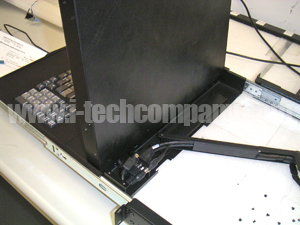 |
Picture 2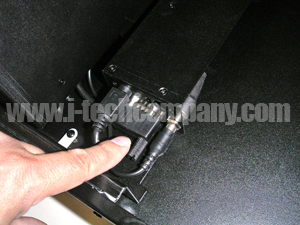 |
Picture 3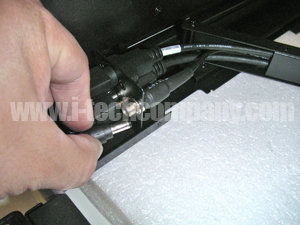 |
|
Please follow the steps procedure:
Step 1. Extend the rack mount forward to expose the compartment behind the screen like in Picture 1.
Step 2. Remove the top 4 screws as well as the 2 behind it
Step 3. Remove metal cover to expose the wires
Step 4. Check connections

HIGH QUALITY INDUSTRIAL COMPONENTS
i-Tech Company LLC provides industrial LCD displays, panel PCs, rackmount computers, embedded systems and rugged computing solutions using industrial-grade components selected for reliability and long-term operation. We support standard and custom configurations for industrial, commercial and specialized applications.

CUSTOMER SERVICE & TECHNICAL SUPPORT
Our sales and technical support team assists customers with product selection, specifications, custom configurations and project requirements for industrial monitors, panel PCs, rackmount systems and embedded computers. Contact i-Tech for product recommendations, technical questions and quotation support.

U.S.-BASED INDUSTRIAL DISPLAY & COMPUTER SUPPLIER
i-Tech Company LLC is based in Fremont, California and supplies industrial LCD monitors, touchscreen displays, panel PCs, rackmount computers and rugged computing systems to customers in the U.S. and worldwide. We support standard, build-to-order and custom solutions through U.S. operations and global manufacturing resources.